Top 25 Must know Playwright Interview Questions (With Framework Design with best Examples)
Automation testing tools have evolved significantly over the past few years. While Selenium dominated the automation landscape for more than a decade, modern web applications now demand faster, more reliable, and scalable testing solutions.
One such powerful tool that has rapidly gained popularity among automation engineers is Playwright, developed by Microsoft.
It provides an advanced end-to-end testing framework capable of automating modern web applications across multiple browsers including Chromium, Firefox, and WebKit. With features like built-in auto waiting, parallel execution, network interception, and API testing, Playwright has become one of the most preferred tools for automation engineers preparing for technical interviews.
This interview preparation guide covers essential concepts including architecture, framework design, synchronization, advanced automation techniques, and commonly asked interview questions.
If you are preparing for automation interviews or planning to transition from Selenium to Playwright, this guide will help you understand everything from fundamentals to advanced topics.
What is Playwright?
Playwright is an open-source end-to-end automation testing framework developed by Microsoft that allows testers and developers to automate modern web applications.
It supports automation across multiple browsers including:
- Chromium (Chrome, Edge)
- Firefox
- WebKit (Safari engine)
It is designed to provide fast, reliable, and scalable automation, eliminating many of the issues traditionally faced in Selenium automation frameworks.
Key capabilities includes:
- Cross-browser automation
- Built-in test runner
- Automatic waiting mechanism
- Parallel test execution
- API testing capabilities
- Network request interception
- Mobile device emulation
Unlike Selenium, Playwright does not rely on the WebDriver protocol. Instead, it communicates directly with browser engines, which results in faster execution and improved stability.
This is one of the major reasons why many modern companies are gradually adopting Playwright for automation frameworks.
Why Playwright is Becoming Popular in Automation Testing?
It gained significant popularity because it solves many problems that testers traditionally faced while using Selenium.
Some of the key reasons include:
Faster Test Execution
it uses a modern architecture that allows faster interaction with browsers compared to WebDriver-based tools.
Built-in Synchronization
One of the biggest challenges in automation testing is synchronization. It automatically waits for elements to become ready before performing actions.
This reduces the need for:
- Explicit waits
- Thread.sleep
- Complex synchronization logic
Cross Browser Testing
It supports three browser engines:
- Chromium
- Firefox
- WebKit
This allows testers to validate applications across multiple browsers using a single API.
Parallel Execution
It supports parallel execution out of the box, enabling faster test runs in CI/CD pipelines.
Network Control
It allows testers to intercept and modify network requests. This helps simulate scenarios such as:
- API failures
- Slow network
- Mock responses
These features make this tool as a powerful tool for building enterprise level automation frameworks.
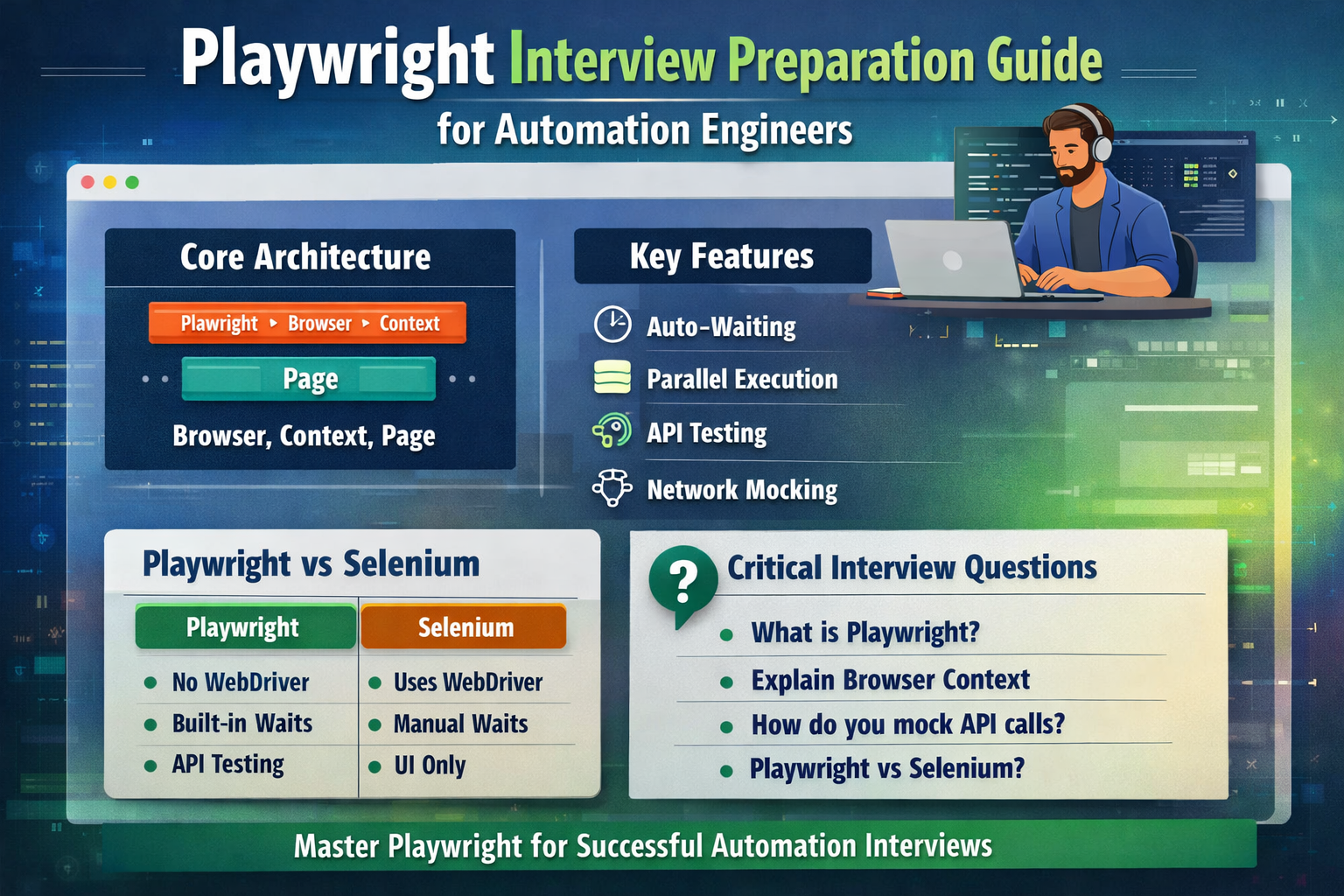
Playwright Architecture (Important Interview Topic)
Understanding architecture is extremely important during automation interviews.
The architecture follows a layered structure:
Playwright
   ↓
Browser
   ↓
BrowserContext
   ↓
Page
Each layer plays a specific role in automation execution.
Browser
The Browser object represents the browser instance launched by Playwright.
Example:
const browser = await chromium.launch();
A browser instance can create multiple contexts and pages.
BrowserContext
A BrowserContext represents an isolated browser session, similar to an incognito window.
Each context contains:
- Separate cookies
- Independent storage
- Separate cache
- Independent session data
Example:
const context = await browser.newContext();
The biggest advantage of BrowserContext is test isolation.
Each test can run inside its own context, preventing data conflicts between tests.
Page
A Page object represents a single browser tab.
Example:
const page = await context.newPage();
All automation actions such as clicking elements, filling forms, and validating UI components are performed using the Page object.
Playwright Test Structure
This includes its own built-in test runner called Playwright Test.
A simple test example looks like this:
import { test, expect } from '@playwright/test';test('Login functionality', async ({ page }) => {
  await page.goto('https://example.com');  await page.fill('#username', 'admin');
  await page.fill('#password', 'password');  await page.click('#login');  await expect(page).toHaveURL('https://example.com/dashboard');
});
Important concepts used in this example include:
- Async / Await for asynchronous operations
- Built-in test runner
- Page fixtures
- Smart assertions
Playwright test runner provides many advanced features including retries, parallel execution, and reporting.
Auto Waiting Mechanism
Synchronization is one of the most important topics in automation testing interviews.
Playwright solves this problem using auto waiting.
Before performing any action, it automatically checks if the element is ready for interaction.
It will waits for conditions such as:
- Element is visible
- Element is attached to DOM
- Element is stable
- Element is enabled
Example:
await page.click('#submit');
Even if the element takes time to appear, it will automatically wait before performing the click.
This eliminates the need for:
- Hard waits
- Explicit waits in most cases
As a result, tests are less flaky and more reliable.
Locator Strategy:
Choosing the right locator strategy is critical for building stable automation tests.
It encourages user-centric locators.
Recommended locator methods include:
page.getByRole()
page.getByText()
page.getByLabel()
page.locator()
Example:
await page.getByRole('button', { name: 'Login' }).click();
These locators are more reliable because they mimic how users interact with applications.
Avoid excessive use of:
page.$()
as it bypasses many features like auto waiting.
Using good locator strategies improves:
- Test stability
- Readability
- Maintainability
Parallel Execution:
Modern CI/CD pipelines require fast execution of automation suites.
It supports parallel execution using workers.
Example configuration:
export default {
  workers: 4
};
Each worker runs tests independently in separate browser contexts.
Benefits include:
- Faster test execution
- Better resource utilization
- Scalable automation frameworks
Parallel execution is one of the biggest advantages of Playwright compared to traditional frameworks.
API Testing:
It also supports API testing, which allows testers to validate backend services without using external tools.
Example:
const response = await request.get('/api/users');expect(response.status()).toBe(200);
This capability allows automation engineers to combine:
- UI testing
- API testing
within the same framework.
This approach helps validate complete end-to-end workflows.
Network Interception and Mocking
Network interception is an advanced feature commonly discussed in interviews.
Example:
await page.route('**/api/users', route =>
  route.fulfill({
    status: 200,
    body: JSON.stringify({ name: 'Mock User' })
  })
);
This allows testers to:
- Mock backend responses
- Simulate API failures
- Test edge cases
Network mocking is extremely useful when backend services are unstable or unavailable.
Handling Multiple Tabs:
Some applications open new browser tabs or windows.
Playwright handles this using event listeners.
Example:
const [newPage] = await Promise.all([
  context.waitForEvent('page'),
  page.click('a[target="_blank"]')
]);
This ensures proper synchronization when new tabs are opened.
Handling iFrames
iFrames are common in modern applications.
It provides dedicated APIs to handle them.
Example:
const frame = page.frame({ name: 'frameName' });await frame.click('#submit');
This makes iframe automation simpler compared to traditional tools.
Authentication Handling using Storage State:
Enterprise applications often require login authentication.
it allows session reuse using storage state.
Example:
await context.storageState({ path: 'auth.json' });
Benefits include:
- Skip repeated login steps
- Faster execution
- Stable regression suites
Playwright Reporting and Debugging Tools
It provides built-in debugging capabilities.
These include:
- HTML reports
- Screenshots on failure
- Video recording
- Trace Viewer
Trace Viewer is particularly powerful for analyzing failed tests.
It allows testers to view step-by-step execution of test actions.
Playwright Framework Design (Important for Experienced Engineers)
A scalable framework typically follows a structured folder layout.
Example structure:
tests/
pages/
fixtures/
utils/
config/
playwright.config.ts
Common design patterns include:
- Page Object Model
- Custom fixtures
- Environment configuration
- Test data management
This structure improves maintainability and scalability of automation frameworks.
Playwright vs Selenium
| Feature | Playwright | Selenium |
|---|---|---|
| WebDriver dependency | Not required | Required |
| Auto waiting | Built in | Manual |
| Parallel execution | Native support | Complex setup |
| API testing | Built in | External tools |
| Test stability | High | Often flaky |
Playwright is considered a modern alternative to Selenium, offering faster and more reliable automation.
Top Interview Questions
Some commonly asked interview questions include:
- What is Playwright and how is it different from Selenium?
- Explain Playwright architecture.
- What is BrowserContext?
- How does Playwright handle synchronization?
- What are the best locator strategies in Playwright?
- How do you implement network mocking?
- How do you design a scalable Playwright framework?
- How does Playwright support parallel execution?
- How do you handle authentication in Playwright?
- How do you integrate Playwright with CI/CD pipelines?
Have a look on Testng related Blog TestNG Automation Framework – Complete Architect Guide for Enterprise CI/CD & Parallel Execution
Have a look on Cucumber related Blog For a complete BDD implementation guide, read our Cucumber Automation Framework – Complete Beginner to Advanced Guide.
Have a look on API Authentication related Blog , read our The Ultimate API Authentication guide
Have a look on Top 55 Best Java Interview Questions and Answers (With Code Examples) – Complete Guide for 2026
External Links for reference :
Playwright official documentation
Playwright GitHub repository
Conclusion
Playwright has quickly become one of the most powerful automation frameworks available today. Its modern architecture, built-in synchronization, cross-browser support, and advanced debugging capabilities make it ideal for testing modern web applications.
For automation engineers preparing for interviews, understanding key topics such as it’s architecture, locators, synchronization, framework design, and network interception is essential.
Mastering these concepts will help you confidently answer interview questions and design scalable automation frameworks for enterprise projects.